
Huck's Bucks Bigg Rewards
HucksFood & Drink
4.0645.00 Reviews
- Version
- 43.01.01
- Installs
- 100.00K
- Age Rating
- Mature 17+
Screenshots
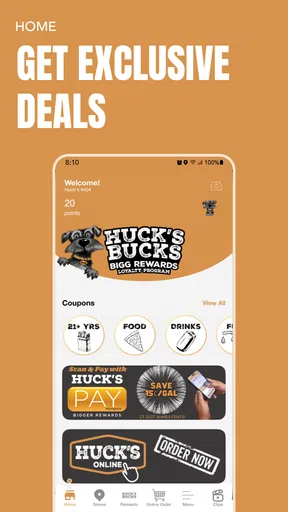
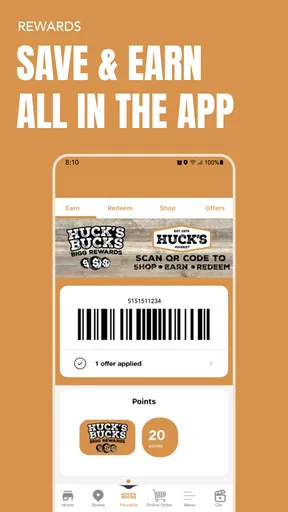
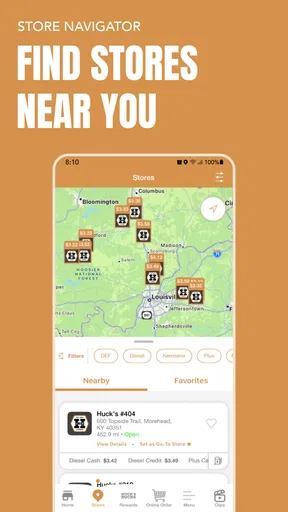
Our Review of Huck's Bucks Bigg Rewards
 Analysis by Appyee
Huck's Bucks Bigg Rewards is the kind of food-and-drink app I would judge less by its appearance and more by whether it makes a regular Huck's visit feel worthwhile. Developed by Hucks, it is a free rewards app built around the store's own loyalty experience, rather than a general restaurant discovery tool or a broad coupon marketplace. That focus is important: its value depends mainly on how often Huck's is already part of your routine.
I spent time looking at it as a practical companion for everyday purchases. The central capability is straightforward: it gives Huck's customers a digital place to engage with the Huck's Bucks rewards program. That sounds simple, but loyalty apps live or die by small details. The useful question is not whether a rewards app exists, but whether it is easy enough to use when you are stopping for a drink, snack, fuel break, or quick meal and do not want another complicated step at the counter.
The app has a mature audience rating of 17+, which is worth noticing before installing it, especially if you are setting up a device for a younger family member. It is available at no charge, supports devices running Android 7.0 or later, and the current version is 43.01.01. On Android, it has passed the one-hundred-thousand-install mark and holds an average rating of 4.0 from roughly two thousand ratings, so it is established enough to have a meaningful user base without being one of the enormous national food platforms.
How the Huck's Bucks capability works in real life
The main strength of Huck's Bucks Bigg Rewards is concentration. Instead of asking me to browse dozens of restaurants, compare delivery fees, or manage unrelated promotions, it is designed for one store brand and its rewards relationship. That makes the app most useful before or during a visit, when I already know I am going to Huck's and want the purchase to count toward the loyalty experience.
My recommended workflow is to install and open the app before arriving, complete the account setup at a calm moment, and then make sure I know how the rewards interaction is presented before standing in line. This is one of the less obvious lessons with store-specific loyalty apps: the best time to learn the interface is not while a cashier is waiting. A short setup check can prevent the awkward situation of searching through screens with one hand while holding a coffee in the other.
Once the account is ready, the app becomes a dedicated home for the Huck's Bucks relationship. I would treat it as a routine tool rather than something to open only when a promotion catches my eye. If I am already stopping at Huck's, checking the app first creates a clear habit: open it, review what is relevant to the visit, complete the purchase in the way the program expects, and confirm that the transaction has been handled correctly when possible.
That habit matters because loyalty programs are easy to forget when they are separated from the purchase. A physical card can be left at home, and a generic payment app may not automatically connect a visit to a store reward account. A dedicated app keeps the loyalty task visible on the phone I am already carrying. The trade-off is that it adds another account and another app to maintain, so the benefit is strongest for people who visit Huck's often enough to justify that small amount of digital housekeeping.
I would also avoid assuming that installing it alone is the same as using it. A rewards app only becomes useful when the customer understands the point at which the account must be identified during a purchase. Before relying on it for an important visit, I would read the in-app instructions carefully and watch for confirmation that the activity has been associated with the account. This is practical advice rather than a criticism of Hucks: every loyalty system has a process, and missing one step can make the experience feel disappointing even when the app itself is working normally.
A realistic morning stop
Imagine a weekday morning when I am driving to work and stop at Huck's for a quick breakfast item and a drink. I do not want to compare menus across multiple services, create a delivery order, or spend time hunting for a general discount. I want the visit to remain quick. In that situation, the app's focused design is an advantage. I can use it as the digital front door to the rewards program, then return to the road instead of managing a broader food platform.
The important preparation happens before the rush. I would sign in at home, keep the app updated, and make sure I can reach the relevant rewards screen without navigating through every section. That small routine is a concrete improvement over treating the app as an emergency coupon drawer. When the morning is busy, fewer taps and fewer decisions make the loyalty benefit feel more natural.
There is another useful scenario: a regular Huck's customer who makes several small visits rather than one large weekly shop. For that person, a dedicated rewards app can make loyalty easier to remember because the store is already part of several ordinary routines. The app does not need to transform the shopping trip. Its job is to reduce the distance between “I am buying something here” and “I am participating in the store's rewards program.”
On the other hand, someone who visits Huck's only once in a long while may not notice much value. The installation, account setup, and remembering to use the app can outweigh the benefit of a single stop. In that case, a general payment method or simply paying normally may be less effort. I would not install this app because loyalty apps are fashionable; I would install it because Huck's is a repeat destination.
What makes the focused approach useful
Compared with broad food apps, Huck's Bucks Bigg Rewards has a narrower job. A delivery service may be better when I want to compare restaurants, order from home, track a courier, or split a meal with other people. A restaurant aggregator may be better for discovering somewhere new. A bank or wallet app may be better for watching overall spending. None of those alternatives is automatically a better replacement for a store-specific rewards account, because they solve different problems.
The focused approach also avoids a common weakness of general food platforms: too much information at the exact moment I need one simple action. If my destination is already Huck's, a dedicated loyalty app can be more direct than opening a marketplace and filtering past businesses I do not want. The benefit is not excitement; it is reduced distraction.
That concentration creates a clear boundary. I would not expect this app to help me choose between competing restaurants, plan a full grocery trip, or manage loyalty programs from other brands. It is not a universal food wallet. Its usefulness is tied to Huck's, and that limitation should be viewed honestly rather than disguised as a flaw. A specialist tool can be better than a broad one when the task is repeated often, but it is unnecessary when the task is occasional.
Small habits that improve the experience
My first tip is to make the app part of the departure routine, not the checkout routine. Open it while parked or before leaving home, review the account area, and know what you need to present or use. This reduces pressure and gives me a chance to notice whether I am signed in to the intended account.
My second tip is to keep the app's role separate from payment. A loyalty app and a payment app are not necessarily interchangeable. I would use the Huck's app for the rewards interaction and use my preferred payment method for the purchase unless the app clearly directs me otherwise. Thinking of those as two connected but separate steps prevents confusion.
My third tip is to check the app after an especially important transaction rather than assuming everything happened automatically. If I am trying to build a consistent rewards history, that confirmation habit is more valuable than opening the app randomly. It also helps identify a sign-in or account issue while the visit is still fresh.
Finally, I would keep expectations realistic. A rewards app is not automatically a money-saving solution for every purchase. The sensible approach is to buy what I already intended to buy and let the loyalty program add value around that behavior. Changing my shopping habits just to chase a reward can erase the convenience I wanted in the first place.
Trade-offs, device support, and everyday fit
The app's age rating may be a practical hurdle for households. Since it is marked Mature 17+, parents should not assume it is appropriate for a child's device simply because the app concerns food and convenience-store purchases. That rating does not tell me how useful the app will be for an adult, but it does affect who should install it and how families manage access.
Android support beginning with version 7.0 makes it accessible to older devices, which is helpful for people who keep a dependable phone for everyday errands instead of upgrading frequently. At the same time, older hardware can make any modern app feel slower or less comfortable than it does on a newer phone. I would leave enough storage and keep the operating system in stable condition, particularly if the app is being used in a time-sensitive checkout situation.
The current release, 43.01.01, is another reason I would keep automatic updates enabled when practical. Loyalty apps can change their screens and account flows over time, and using an outdated build may make instructions look different from what the store expects. I would not update immediately before an important trip if I could avoid it; updating when I have time to open the app afterward is the safer workflow.
There is also the ordinary friction of account management. A dedicated rewards service means remembering which email or login belongs to it, and possibly dealing with sign-in steps when changing phones. For a frequent Huck's customer, that maintenance is reasonable. For a person who dislikes creating accounts for individual retailers, it may be the decisive reason to skip the app.
Privacy and notification preferences deserve a quick review during setup. I prefer to allow only the alerts that I find useful, because a rewards app should support my shopping rather than interrupt me constantly. I would also check that the account details are correct and use a password I do not reuse elsewhere. These are simple precautions, but store loyalty accounts are still accounts, and convenience should not mean careless setup.
The public response is generally positive but not flawless: the app sits at a 4.0 average across about two thousand ratings, with hundreds of written reviews. I read that as a sign of a service people find useful while still leaving room for individual frustrations. A rating in that range is not a guarantee that every device, account, or checkout experience will be smooth. It is better interpreted as evidence that the app has practical appeal without pretending it is universally loved.
Its scale also gives some context. With more than one hundred thousand installs, this is not an abandoned experiment that nobody uses. Still, it remains a brand-specific tool rather than a dominant all-purpose food app. That distinction helps set expectations: I would judge it by whether it makes Huck's visits easier, not by whether it offers the breadth of a national restaurant marketplace.
Who benefits most from installing it
The strongest match is a customer who visits Huck's regularly, carries an Android phone that meets the minimum system requirement, and is willing to spend a few minutes setting up a dedicated rewards account. For that person, the app can turn a repeated physical habit into a more organized digital one. The gains are cumulative in the practical sense: the more naturally it fits into existing visits, the less noticeable the setup effort becomes.
It is also a good fit for someone who prefers a store's own app over a crowded third-party platform. If I already know where I am buying food or drinks, I would rather use a focused tool than browse a large marketplace full of irrelevant options. The app's narrow purpose becomes a strength when my destination is already decided.
I would be more cautious if I rarely visit Huck's, frequently switch between different store brands, or want one application to manage all food rewards. In those cases, a broader loyalty wallet or the individual programs I use most may be more convenient. The best alternative depends on the routine: discovery calls for a marketplace, payment tracking calls for a finance tool, and repeated Huck's visits are where this app makes the clearest case.
People who are uncomfortable with account setup should also think about the trade-off before downloading. The app is free, but free does not mean frictionless. The cost is measured in attention, storage, and remembering to use the account correctly. If I am not prepared to make it part of the purchase routine, I would probably leave it off my phone.
My final take on the rewards experience
Huck's Bucks Bigg Rewards succeeds when I treat it as a practical loyalty companion rather than a complete food service. Its central capability is valuable because it is specific: it gives Huck's regulars a dedicated way to interact with the brand's rewards program. That focus will not appeal to everyone, but it keeps the app's purpose clear.
I would recommend trying it if Huck's is already one of your normal stops. Set it up before the first busy visit, learn the rewards workflow while you have time, and make checking the app part of your departure routine. Those steps address the main source of disappointment with loyalty tools: expecting the phone to do everything automatically without learning how the account is meant to be used.
I would skip it if your visits are rare or if you are looking for restaurant discovery, delivery, or a single universal rewards hub. In my experience, a narrow app earns its place only when its narrow task happens often. For the right customer, the free download and established user base make it a sensible experiment; for everyone else, its store-specific focus may be more limitation than benefit.
Overall, I see Hucks' app as a useful, focused addition for repeat customers, with enough maturity to be taken seriously and enough setup responsibility that users should approach it deliberately. If Huck's is already part of your weekly routine, the app has a clear chance to make that routine more rewarding without adding much complexity.
Verdict
Strengths of Huck's Bucks Bigg Rewards
- Simple reward system makes it easy to understand how points are earned.
- Redeeming points can provide useful discounts and savings on purchases.
- The app may offer exclusive promotions not available through regular channels.
- A digital rewards account reduces the need to carry physical loyalty cards.
- Suitable for frequent customers who want to track their benefits in one place.
Limitations of Huck's Bucks Bigg Rewards
- Rewards may have expiration dates or other conditions users must monitor.
- Benefits can be limited if participating stores or locations are unavailable nearby.
- The app’s usefulness depends heavily on how often you shop with the brand.
- Some offers may require minimum purchases or exclude selected products.
- Account, location, or notification permissions may be needed for full functionality.
Similar Picks in This Category
View All
Rappi: Food Delivery, Grocery
Rappi, Inc - Delivery3.5

McDonald’s: Cupons e Delivery
Arcos Dorados4.3

Swiggy: Food Instamart Dineout
Swiggy4.7

Blinkit: Groceries & more
Blinkit4.8

foodpanda: food & groceries
Foodpanda GmbH a subsidiary of Delivery Hero SE4.0

Zomato: Food Delivery & Dining
Zomato4.7
Frequently Asked Questions
What is Huck's Bucks Bigg Rewards?
Huck's Bucks Bigg Rewards is the loyalty app for participating Huck’s Market locations. After creating an account, you can use the app to view available promotions, collect rewards, and access member benefits connected to eligible purchases. The exact offers may vary by store, location, and promotion period, so it is worth checking the app regularly before shopping.
How do I earn rewards with Huck's Bucks Bigg Rewards?
Rewards are generally earned by identifying yourself as a program member when making eligible purchases at participating Huck’s locations. Depending on the current campaign, this may involve scanning a membership code, using a linked account, or meeting specific purchase requirements. Always read the terms shown in the app, because some products, fuel purchases, or promotions may have exclusions.
Is Huck's Bucks Bigg Rewards free to download and use?
The app is typically free to download, and joining the loyalty program does not usually require a subscription fee. However, downloading the application may use mobile data, and normal purchase requirements still apply when earning or redeeming rewards. Before signing up, review the available terms, privacy information, and any conditions associated with individual offers.
Can I use Huck's Bucks Bigg Rewards at every Huck’s location?
Availability and reward functionality can depend on the participating store, region, and the specific offer. Some benefits may be limited to selected Huck’s Market locations or may apply only to certain products and services. If you are traveling or visiting a different store, check the app’s offer details or ask staff whether that location accepts the rewards program.
What should I do if my rewards or offers are missing?
If a purchase, reward, or digital offer does not appear correctly, first confirm that you used the same account or membership details registered in the app and that the transaction met the promotion requirements. Checking your internet connection and updating the app may also help. If the issue remains, contact Huck’s customer support or store staff with your account and receipt information.
